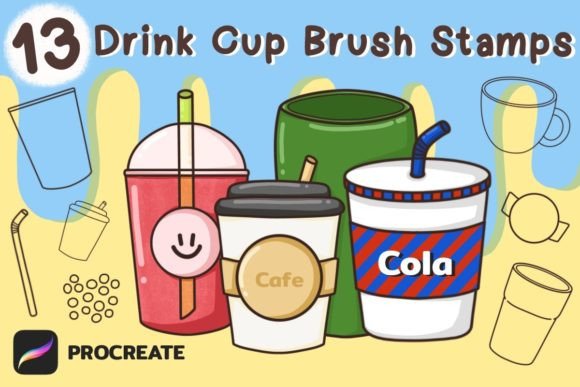
Unlock Digital Artistry with Drink Cup Brushes Stamp for Procreate
Whether you're designing merch for a cafe, creating vibrant social media graphics, or adding charming details to a digital scrapbook, illustrative elements for beverages can be surprisingly tricky. Drawing realistic straws, maintaining the perfect curve of a cup rim, or creating consistent boba pearls across multiple designs often consumes more time than the creative concept itself. This is where a specialized toolset like the Drink Cup Brushes Stamp for Procreate steps in to transform your workflow. It’s not merely a collection of brushes; it’s a precision toolkit designed to bypass repetitive drawing tasks, allowing you to focus on composition, color, and style. For anyone working in digital design, efficiency paired with quality is the ultimate goal.
The Crucial Details Often Overlooked Before Purchase
When browsing for digital assets like Procreate brush sets, excitement for the final artwork can sometimes lead to overlooking practical details. One common oversight is assuming compatibility across different software. The Drink Cup Brushes Stamp for Procreate is packaged as a .brushset file, which is exclusively for Procreate on iPad. If you primarily use Photoshop, Illustrator, or another desktop application, this set will not function, leading to frustration and wasted investment. Always verify the file format against the software you use daily.
Another subtle point is understanding exactly what you’re getting. This set includes 7 distinct cup brush stamps and 6 accessory stamps for elements like tubes, logos, cup sleeves, and pearls. A mistake here is to think “brushes” implies textured, painterly effects. In this context, “stamps” are more akin to smart, scalable vector shapes. They are designed for clean, repeatable placement, perfect for graphic design rather than impressionistic painting. Recognizing this helps you align the tool with the correct projects—ideal for posters, infographics, stickers, and merchandise, not for simulating watercolor washes.
Maximizing Your Use: Avoiding Common Application Errors
Even after correctly downloading and importing the .brushset file, there are practical missteps that can diminish your results. A frequent one is using the stamps at a fixed, small size on a large canvas, resulting in pixelated, low-quality shapes when scaled up later. The better approach is to initially place your stamp at a size larger than you think you need. Since these are vector-based stamps within Procreate, they maintain crisp edges when scaled down, but enlarging a initially tiny stamp can stretch its pixel data. Start big, then reduce.
Layer management is another area where clutter can creep in. Each stamp placement creates a new layer. Without a strategy, you can end up with dozens of unnamed layers containing single cups or pearls, making adjustments a nightmare. Immediately after placing a stamp, rename that layer descriptively (e.g., “Main Cup Left,” “Straw Cluster”). Consider grouping related elements into a layer folder. This simple habit preserves your sanity when refining a complex design with multiple beverage illustrations.
Integrating Brushes Creatively Beyond the Obvious
A common creative limitation is using the assets only for their literal purpose. The accessory stamps—like tubes, logos, and sleeves—are not just for drink design. That logo stamp could become a minimalist badge on a t-shirt design. The tube shape could be repurposed as a sleek element in a tech infographic. The pearl stamps might serve as delightful decorative dots in a child’s book illustration. The key is to experiment with color, rotation, and combination. Don’t just stamp a default cup; use Procreate’s color dynamics to fill it with gradients, patterns, or textures from other brushes to create entirely unique vessels.
Furthermore, overlooking the power of duplication and symmetry tools within Procreate alongside these stamps is a missed opportunity. For a design featuring a row of matching mugs, stamp one cup, then duplicate its layer and distribute copies, ensuring perfect consistency. For a symmetrical graphic with drinks facing each other, use the stamp, then flip the layer horizontally. This leverages the precision of the stamp to achieve geometric accuracy that hand-drawing struggles to match.
Ensuring a Smooth Start: The Pre-Use Checklist
Before you even import the brush set or begin your first project, a few quick checks can set you up for success. First, confirm your Procreate version is up-to-date. Older versions might have issues importing newer .brushset files. Second, after downloading the provided zip file, use a reliable file management app on your iPad to extract it. Occasionally, files can become corrupted if extraction is interrupted. Locate the extracted .brushset file and tap to import directly into Procreate—it should appear in your brush library automatically.
Next, dedicate a few minutes to a test canvas. Stamp each brush on a blank document, play with size sliders, test pressure sensitivity (some stamps may have subtle taper effects), and experiment with different colors. This familiarizes you with each asset’s behavior and saves time during an actual client project or personal work. Notice the accessory stamps specifically; understanding their scale relative to your cup stamps ensures harmonious compositions.
From Digital File to Physical Product: Quality Considerations
Many users acquire this brush set for creating physical products like stickers, mugs, t-shirts, and cards. Here, a critical mistake is neglecting final output resolution. While the stamps themselves are high-quality, your canvas setup dictates the print result. Always begin your design on a canvas set to a minimum of 300 DPI (dots per inch) at the intended physical size. For example, if designing a 4-inch sticker, your canvas should be 4 inches at 300 DPI. Placing stamps on a small, low-DPI canvas and then enlarging the entire artwork for print will result in poor quality, blurred edges, and unsatisfying products.
Also, consider color profiles. Designs intended for web use (RGB) can look differently when converted for professional printing (CMYK). If you’re sending your drink cup design to a merch printer, ask for their color profile specifications and adjust your Procreate document accordingly before finalizing. Using the vibrant, RGB-only colors from your iPad screen for a CMYK print job can lead to muted, unexpected results. This step ensures the bright, inviting drink you designed looks just as vibrant on the final t-shirt or poster.
Ultimately, tools like the Drink Cup Brushes Stamp for Procreate are bridges between creative vision and polished execution. By paying attention to compatibility, understanding the asset nature, managing your technical setup, and thinking creatively about application, you transform a simple brush set into a robust engine for professional and personal projects. It allows you to produce consistent, appealing imagery with a speed that fosters more experimentation and more finished work—the true goal for any creator, entrepreneur, or designer leveraging digital art today.